When the operators are done tuning the beam to DRAGON the first step is always checking the transmission, beam energy and alignment.
If everything looks good then record the valuse for transmission, alignment (whether it is good or not), and beam energy (as well as how you calculated beam energy) in the MIDAS ELOG.
Checking Transmission:
Make sure there is no gas in the target
Check that all faraday cups are in (MCP's out, charge and mass slits open, profile monitor is not in, and all necessary valves open)
run the XA_transmission.rossum script either by typing in the command line
./startTransmission.sh ... or...
???
A window will pop up, click start tasks then let rossum do its thing
when it is done click exit and rossum will spit out numbers
Record transmission percentage and uncertainty
Dragon does not accept less than 90% transmission (generally as a rule of thumb. special cases may apply)
Now to check the energy you can either do so with gas in the target or with out. To determine have epics open and go to Optics then open the new scaling page. --> Eeter the mass and charge state of the beam as well as the beam energy (??) hit enter (DO NOT HIT APPLY TUNE yet). --> look at the NMR1 value --> If it is less than 5950 G you can bend it without gas --> if it is greater than that you need gas to bend it
Checking the energy in (no gas in the target: NMR1 < 5950 G):
Put FC1 in
close charge slits to 2 mm
go to new scaling page (check that charge state, mass, energy are correct) hit enter NOW HIT APPLY TUNE
Pull out FC1 (again making sure cups are in everywhere else)
check if beam is centered in the charge slits
adjust Energy on scaling page until beam is centered
if you cant see beam for whatever reason check the alignment on the profile monitor
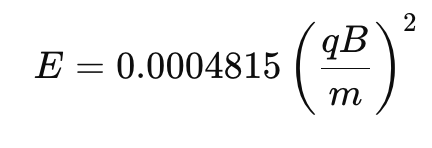
Once beam is centered RECORD NMR1 value and calculate beam energy using the formula. Where B is the NMR1 vlaue in Gauss, q is the charge state, m is the mass (preferably use the exact mass in AMU)
If energy looks good (usually within 5 keV/u of what we asked for form ops) doccument energy and open charge slits again.
Checking the alignment:
Put FC1 in
Put the profile monitor in
take FC1 out see how beam looks (left figure is the x and right is the y) --> you may need to adjust the gain scale to see the peak clearly
turn the quads off (Q1 and Q2) and see how much the peak of the centroid moves. If the alignment is good then the peak will not move more than 1.5 of the green wires. If the peak moves more than 1.5 of the green wires alignment is bad.
If transmission, alignment, and energy look good then you are good to continue tuning through dragon (make sure to call ops and tell them things look good and thank them!)
If any one of these looks bad the beam needs to be given back to ops and reworked. (usually changing alignment messes with transmission so it is tricky)
This is an itereative process usually but again dragon needs all 3 to be good before continuing